사진첩이 스스로
정리되는 나만의 우주Your photos,
organized by themselves
여행·모임·일상으로 묶고, 말로 물으면 찾아 줘요. 사진과 얼굴 정보는 휴대폰 밖으로 나가지 않아요.Trips, gatherings and everyday moments, grouped for you and found when you ask. Your photos and face data never leave your phone.
찾고 싶은 순간이 금방 나와요The moment you want, right away
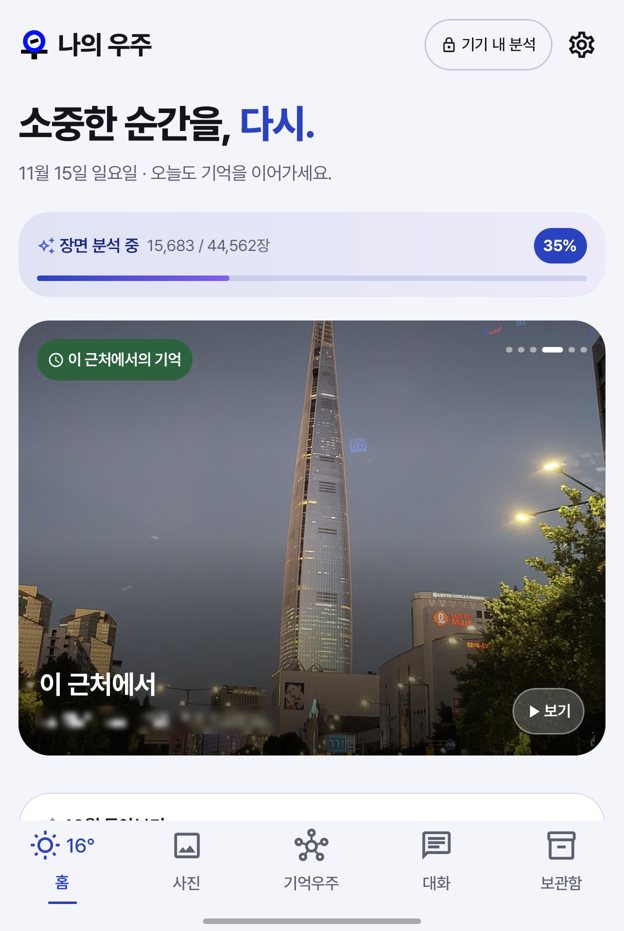
수만 장의 사진도 휴대폰 안의 AI가 살펴보고 사람·장소·시간으로 이어 둬요.An AI on your phone looks through tens of thousands of photos and links them by people, places and time.
말로 찾기Ask in plain words
날짜·장소·사람·장면을 섞어 물어도 알아들어요.Mix dates, places, people and scenes in one question.
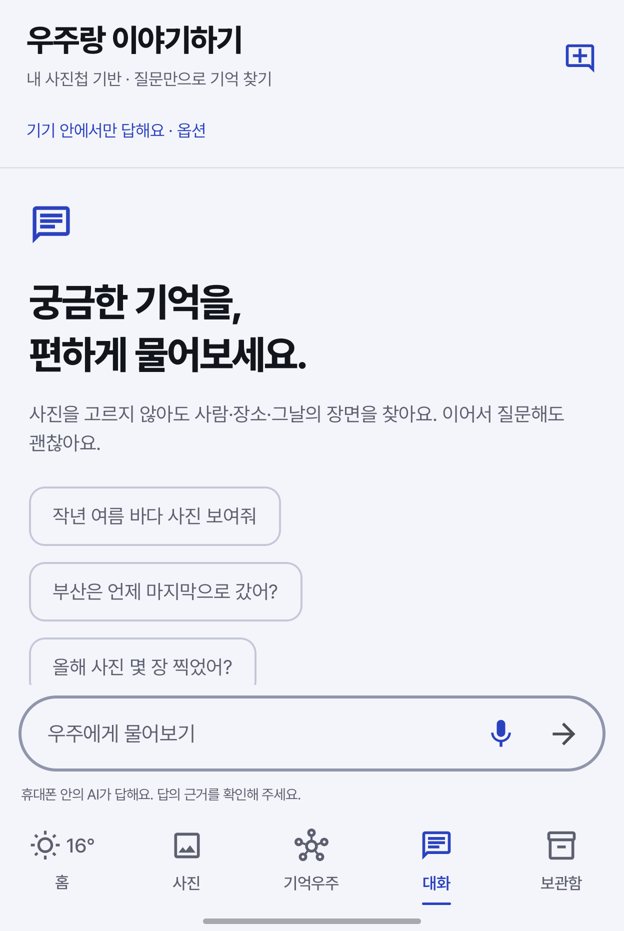
“작년 여름 부산에서 찍은 사진”“Photos from Busan last summer”우주랑 이야기하기Chat with Woozoo
휴대폰 안에서 도는 AI와 사진 이야기를 나눠요. 말로 물으면 소리 내어 답해요.Talk about your photos with an AI running on your phone. Ask by voice and it answers aloud.
“부산은 언제 마지막으로 갔어?”“When did I last go to Busan?”이벤트와 스토리Events and stories
여행과 모임을 자동으로 묶어 한 편의 스토리로 보여 줘요. 오늘 날씨와 닮은 날도 꺼내 줘요.Trips and gatherings become stories. It also brings back days that look like today's weather.
기억우주Memory Galaxy
사람·장소·사물이 이어진 내 기억을 3D 우주로 둘러봐요.Explore people, places and things as a 3D map of your memories.
나만의 금고My Vault
신분증·카드 사진은 물론, 암호화 키·인증서·계약서 같은 문서까지 보안이 필요한 파일을 암호화해 나만 열 수 있게 보관해요. 금고에 넣을 만한 사진은 AI가 골라 줘요.Not just photos of IDs and cards: keep encryption keys, certificates, contracts and any file that needs protecting, encrypted so only you can open them. The AI suggests photos worth moving.
비슷한 사진 정리Similar photos
연사·중복 사진을 묶어 보여 줘서 정리하기 쉬워요.Bursts and duplicates are grouped so cleanup is easy.
운영 서버가 없어요There is no backend server
분석·검색·대화는 모두 휴대폰 안에서 이루어지고, 개발자는 사진을 받거나 볼 수 없어요.Analysis, search and chat happen on your phone. The developer never receives or sees your photos.
- 원본은 그대로Originals untouched사진첩은 읽기만 해요. 금고로 옮길 때만, 직접 확인한 뒤에요.The gallery is only read. Moving to the vault happens only after you confirm.
- 얼굴 인식은 동의할 때만Face recognition is opt-in설정에서 언제든 끄면 얼굴 정보도 바로 지워져요.Turn it off anytime and face data is deleted right away.
- 광고도, 사용 기록 수집도 없어요No ads, no tracking분석 도구나 광고 SDK를 넣지 않았어요.No analytics tools or ad SDKs.
- 날씨는 약 10km 단위로만Weather uses ~10 km precision홈의 날씨를 위해 대략적인 지역만 날씨 서비스에 보내요.Only your approximate area is sent to a weather service for the Home tab.
베타 설치하기Installing the beta
Google Play 출시 전까지 테스트용으로 제공하는 버전이에요.This build is offered for testing until the Google Play launch.
-
APK 내려받기Download the APK
휴대폰의 Chrome이나 삼성 인터넷으로 이 페이지를 열고 베타 APK 받기를 눌러요. “이 파일은 기기에 해를 끼칠 수 있습니다”라는 안내가 나오면 다운로드를 눌러요. Play 스토어 밖에서 받는 모든 앱에 나오는 기본 안내예요.Open this page in Chrome or Samsung Internet on your phone and tap Download beta APK. If you see “This type of file can harm your device”, tap Download. Android shows this for every app from outside the Play Store.
-
파일 열기Open the file
다운로드가 끝나면 알림이나 화면 아래 안내에서 열기를 눌러요. 놓쳤다면 내 파일 › 다운로드에서
my-universe-beta.apk를 찾아 눌러요.When the download finishes, tap Open in the notification or the prompt at the bottom. If you missed it, findmy-universe-beta.apkin Files › Downloads. -
설치 허용하기 (처음 한 번)Allow installs (first time only)
“보안을 위해 이 출처에서 알 수 없는 앱을 설치할 수 없습니다”가 나오면 설정을 누르고 이 출처 허용을 켠 뒤 뒤로 돌아와요. 갤럭시에서는 설정 › 애플리케이션 › 특별한 접근 › 출처를 알 수 없는 앱 설치에서 사용한 브라우저를 허용해도 돼요. 설치가 끝나면 다시 꺼 두어도 괜찮아요.If you see “For your security, your phone is not allowed to install unknown apps from this source”, tap Settings, turn on Allow from this source, and go back. On Galaxy phones you can also use Settings › Apps › Special access › Install unknown apps for your browser. You can turn it off again after installing.
-
설치하기Install
설치를 눌러요. Play 프로텍트가 “알 수 없는 개발자의 앱”이라고 안내하면 세부정보 더보기 › 무시하고 설치를 눌러요. 아직 Play에 출시하기 전이라 나오는 안내예요.Tap Install. If Play Protect says the app is from an unknown developer, tap More details › Install anyway. This appears because the app isn't on Play yet.
-
처음 실행하기First launch
앱을 열고 사진 접근을 허용해요. 정리와 검색을 하려면 모든 사진 허용이 필요해요. 알림(진행 상황)과 대략적인 위치(홈의 날씨)는 원하면 허용하세요. 거절해도 앱은 그대로 쓸 수 있어요.Open the app and allow photo access. Choose Allow all so it can organize and search everything. Notifications (progress) and approximate location (Home weather) are optional; the app works without them.
-
AI 모델 받기와 첫 분석AI models and first analysis
처음 한 번 AI 모델(약 3GB)을 내려받아요. 모바일 데이터일 때는 받을지 먼저 물어봐요. 사진이 많으면 첫 분석에 시간이 걸리고, 충전 중에 휴대폰이 뜨거워지지 않게 천천히 이어서 진행돼요. 설정에서 언제든 잠시 멈출 수 있어요.The app downloads AI models once (about 3 GB) and asks first if you're on mobile data. With a large library the first analysis takes a while and continues slowly while charging, so the phone doesn't overheat. You can pause it anytime in Settings.
“앱이 설치되지 않았습니다”가 나와요“App not installed”
다른 경로로 받은 나의우주가 이미 있으면 서명이 달라 덮어쓸 수 없어요. 기존 앱을 지우고 다시 설치하세요. 빈 공간이 부족해도 같은 안내가 나와요.If another copy of My Universe from a different source is installed, it can't be overwritten. Uninstall it and try again. Low storage shows the same message.
새 베타로 업데이트하기Updating to a newer beta
이 페이지에서 새 APK를 받아 그대로 설치하면 돼요. 분석 결과와 금고는 그대로 남아요.Download the new APK here and install it over the old one. Your analysis and vault stay as they are.
Play 버전으로 옮기기·지우기Moving to Play or uninstalling
Google Play 버전과는 서명이 달라서, 옮기려면 베타를 지우고 Play에서 다시 설치해야 해요. 앱을 지우면 금고 안의 사진·파일도 함께 지워지니, 먼저 금고에서 내보내기를 해 두세요.The Play version is signed differently, so uninstall the beta and install from Play. Uninstalling deletes everything in My Vault, so export it first.